Following closely on the heels of the previous release, the 4.3 release focuses on network compatibility and testcase configuration improvements based on feedback from customers and from our services work in the past year with such clients as the US Census and the New York Marathon.
JSON and custom parsers
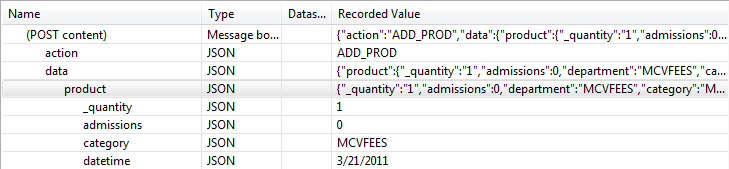
JSON support – Load Tester now understands the JSON data format which is popular in AJAX apps. A new parser allows the fields view to display the fields within JSON data structures and new detection rules will automatically configure many JSON-related fields.
Parser customization: Load tester now allows selection of which parser to … Continue reading »
Load Tester 4.3 carries a number of improvements for both ease of configuration, and accuracy of test simulation. Among these improvements comes support for speculative authentication, allowing Load Tester to simulate behavior from IE 9. The speculative authentication is only used for HTTP authentication schemes used by Load Tester’s Connection Negotiation Authentication feature. More information about HTTP authentication is available under How HTTP Authentication works and why load testers should care.
To describe the speculative authentication feature, it is easiest to simply look at a testcase using Basic Authentication.
Continue reading »
Sometimes while recording a testcase, you might capture URLs (like google analytics and certain 3rd party content) that you do not necessarily want to load test. In previous versions of Load Tester, removing any unwanted URLs required selecting the unwanted link and deleting each link individually. Removing the links could be cumbersome and time consuming especially if the unwanted URLs were repeated multiple times on different pages. With the 4.2 release of Load Tester, the Mass Delete function can now be used to delete multiple URLs with the same domain name at the same time.
Note: Recording unwanted URLs can be … Continue reading »
There’s no doubt that generating load from anyplace in the world at just the push of a button is one of the cloud’s killer applications. Since we first released the ability to generate load from the cloud back in late 2009 people have logged over 33,000 hours of remote load testing from the cloud. And not a crippled cheapo service, either, but full blown, enterprise quality testing with expert technical support backed by a professional services team.
I still get a kick out of running load tests from the cloud, specifically watching Amazon’s EC2 spin up dozens of computers and … Continue reading »
Because we usually talk about latency in tiny numbers (e.g. 20 milleseconds of latency) it is easy to overlook just how big an effect latency can have on the effective bandwidth between geographically distant locations. While running some recent tests to measure the available bandwidth from our cloud engines, I accidentally ran a test between a load engine and a server that were more than 2600 miles apart. Knowing that our server and engine should have both delivered better results, it took me a few minutes to realize that one mistaken click (where to start the load engine) had … Continue reading »
Over the last year, Web Performance engineers have been working to make Load Tester smarter and easier to configure. Load Tester 4.2 introduced the new Fields View, which allows test case developers to write out HTTP requests using a flexible and composable assortment of data sources.
Starting with Load Tester 4.3, Load Tester will automatically recognize JSON content in any HTTP request. As a consequence, each JSON element will become a configurable name-value pair field in the Fields View. We believe this will make it much easier to configure complex AJAX and RESTful style test cases.
Furthermore, whenever Load Tester’s Application … Continue reading »
Now if you have even a single server monitoring license you can monitor an unlimited number of servers at no extra charge! The Server Monitoring modules are add-ons for Load Tester that add the ability to monitor a couple dozen different parameters from the Windows or Linux operating systems or the .NET application server. Previously they were licensed on a per-server basis, which meant a license had to be issued for each server, and customers who purchased a bunch had the hassle of managing a handful of licenses, each of which had to be installed and updated.
In … Continue reading »
I got into a discussion in the Performance Testing group on LinkedIn which raised a question that we had answered internally, but had neglected to share with our customers – how much bandwidth do our cloud engines have available?
Before I proceed, I must make this disclaimer: our cloud engines run on Amazon’s EC2 infrastructure, so the rules that apply there also apply to our cloud engines. Amazon does not make any guarantees for bandwidth, so anytime your test results look suspicious, we recommend doing a quick bandwidth test. Note that there is a Bandwidth Test wizard in Load … Continue reading »
From time to time we get support questions from customer asking us how to update a recorded testcase to a different URL without having to re-record the testcase. If the content of the new URL/server is very similar to the original URL/server, then a re-recording of the testcase may not be necessary. Simply updating the recorded URLs with the new URLs should be all that is needed to get the original recording working with the new URL/server. Below are the steps on how to update recorded URLs in Load Tester 4.2.
Updating recorded URLs
In order to change the transaction URLs, switch to … Continue reading »
Proxy servers are nothing new to corporate users, and Load Tester has supported test development through a proxy server for those testers that were required to use one. However, we’re excited to introduce two new improvements to Load Tester’s proxy support for Load Tester 4.3: more detailed recordings and replays of proxy traffic, and support for proxy authentication.
In all versions of Load Tester, it is possible to change the proxy configuration, and then play an existing testcase correctly using the new proxy settings. Since proxies may require the use of additional HTTP messages to create a tunnel and / or … Continue reading »