When our customers have bandwidth limitations or latency issues, we often encourage them to use a Content Delivery Network. A Content Delivery Network can offer a variety of benefits. What is a Content Delivery Network and what are the pros and cons of using one?
A Content Delivery Network is a cluster of web servers located in different parts … Continue reading »
Customers occasionally ask us “How early should we begin load testing?”
The answer is to test something, anything, as soon as the architecture is available. Performance problems have a wide variety of causes – from a single line of code to a load balancer setup; from a database schema to a server config file. Early in the development of the software you can catch simple coding problems and fundamental architectural limitations that are much easier to fix before a lot of code has been written.
Now, a word of caution: Testing against a scaled-down development or … Continue reading »
Performance starts with the developers as well as the server and network administrators. High-capacity websites do not happen by accident. To perform well and scale big, the system must be designed, built and configured for performance. That means it must be coded and configured with performance in mind, right from the start. Make sure the developer and admins all understand the levels to which the system must perform. Don’t make them guess what “it has to be fast” means.
Two of the most important tasks the test and project management teams to can do to help:
Identify the performance goals for the … Continue reading »
Load Tester 4.3 carries a number of improvements for both ease of configuration, and accuracy of test simulation. Among these improvements comes support for speculative authentication, allowing Load Tester to simulate behavior from IE 9. The speculative authentication is only used for HTTP authentication schemes used by Load Tester’s Connection Negotiation Authentication feature. More information about HTTP authentication is available under How HTTP Authentication works and why load testers should care.
To describe the speculative authentication feature, it is easiest to simply look at a testcase using Basic Authentication.
Continue reading »
Because we usually talk about latency in tiny numbers (e.g. 20 milleseconds of latency) it is easy to overlook just how big an effect latency can have on the effective bandwidth between geographically distant locations. While running some recent tests to measure the available bandwidth from our cloud engines, I accidentally ran a test between a load engine and a server that were more than 2600 miles apart. Knowing that our server and engine should have both delivered better results, it took me a few minutes to realize that one mistaken click (where to start the load engine) had … Continue reading »
Over the last year, Web Performance engineers have been working to make Load Tester smarter and easier to configure. Load Tester 4.2 introduced the new Fields View, which allows test case developers to write out HTTP requests using a flexible and composable assortment of data sources.
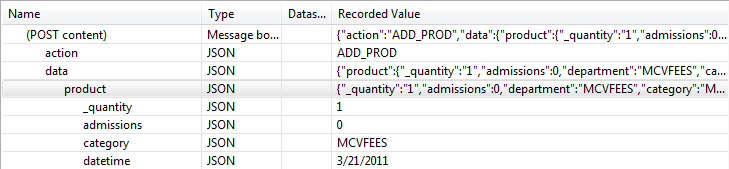
Starting with Load Tester 4.3, Load Tester will automatically recognize JSON content in any HTTP request. As a consequence, each JSON element will become a configurable name-value pair field in the Fields View. We believe this will make it much easier to configure complex AJAX and RESTful style test cases.
Furthermore, whenever Load Tester’s Application … Continue reading »
I got into a discussion in the Performance Testing group on LinkedIn which raised a question that we had answered internally, but had neglected to share with our customers – how much bandwidth do our cloud engines have available?
Before I proceed, I must make this disclaimer: our cloud engines run on Amazon’s EC2 infrastructure, so the rules that apply there also apply to our cloud engines. Amazon does not make any guarantees for bandwidth, so anytime your test results look suspicious, we recommend doing a quick bandwidth test. Note that there is a Bandwidth Test wizard in Load … Continue reading »
The most commonly used authentication method for websites is a login form on a web page. We’ve all seen them – enter your username and password into fields on the web page and press the Submit or Login button. From the standpoint of the underlying technology, this is no different than submitting any other form – only the names of the fields distinguish them as login or password fields and the security mechanism is implemented within the web application.
Web Performance Consulting
Our experts … Continue reading »
The 4.2 release focuses on platform compatibility and productivity increases from our services work in the past year with such clients as the US Census and the New York Marathon.
With a slew of new browsers and operating systems available, this release also includes support for 64-bit Windows and AIX operating systems, the latest versions of Internet Explorer, as well as the Chrome and Safari browsers.
On the productivity side there are some pretty big changes to allow testers to configure more complex testcases with less effort than ever before. Some of those changes are evident in the new Fields View and … Continue reading »
A common problem when setting up a load testing configuration in Load Tester is figuring out how many rows of data you need for a particular test. For example, you need to have a set of user names and passwords to be used during the test, but how many do you need to ensure that the test will complete?
To answer this question, you need to know three things: the duration of the test, the expected duration of the test case, and how many concurrent users the test will simulate. Fortunately, these things are usually easy to determine. The test duration … Continue reading »
Occasional load-testing tips, performance-engineering notes, and product updates. No spam — unsubscribe anytime.