Announcing Load Tester 7.0 External Beta!
AI that works for you — not the other way around.
After 27 years of accelerating the web, we’re shipping Web Performance Load Tester 7.0. It’s our biggest release since the product debuted in 2000, and it’s the release where AI finally pulls its weight in a load-testing tool. But it’s AI on our customers’ terms, not the industry’s. The four pillars of 7.0 are about keeping you in control of your data, your infrastructure, and your costs — while taking the tedious parts of load testing off your plate.
- Bring your own AI — your API keys, your models, your budget
- Bring your own cloud — load generation in your AWS account
- AI-assisted test case development — complex auth flows configured in
minutes, not days - AI-assisted reports — performance analysis that reads like it was
written by a consultant, because it’s grounded in the same analytical
patterns consultants use
Let’s walk through each.
Bring Your Own AI
Most AI product launches right now ask for the same thing: upload your data to our cloud, pay us per API call, and trust us with whatever comes out the other side.
WPLoadTester 7.0 flips that. You plug in your own API key — Anthropic, OpenAI, or AWS Bedrock — and we route straight from your workstation to the model provider. Your prompts, your recordings, your test results never pass through our servers.
That matters for three reasons:
- Security policy. If your security team won’t let you copy a
production recording to a vendor’s cloud, that policy doesn’t stop
applying just because the vendor is an AI company. BYO-AI keeps the data
where it already is. - Cost. You pay the provider directly at their rates, not a vendor
markup. For most teams, a full test-case configuration run costs a few
cents, and a full report generation run costs a few dollars. - Model choice. Use the model you already trust. Switch providers
whenever you want. If Anthropic ships a smarter model next month, you get
it immediately — no waiting for us to certify it.
Bring Your Own Cloud
Cloud load testing has historically meant “we run the load generators, you pay us by the virtual user.” That model prices out workloads with real-world concurrency, and it creates compliance headaches the moment the system under test lives on a private network.
In 7.0, cloud load generation runs in your AWS account. We provision EC2-based load engines directly into your VPC, hit your private endpoints without VPN gymnastics, and tear everything down when the test is over. You see the actual EC2 bill — usually a rounding error compared to a SaaS subscription.
For customers with data residency requirements, compliance regimes, or internal-only staging environments, BYOC is the difference between “we can’t load test this” and “we just ran it.”
AI-Assisted Test Case Development
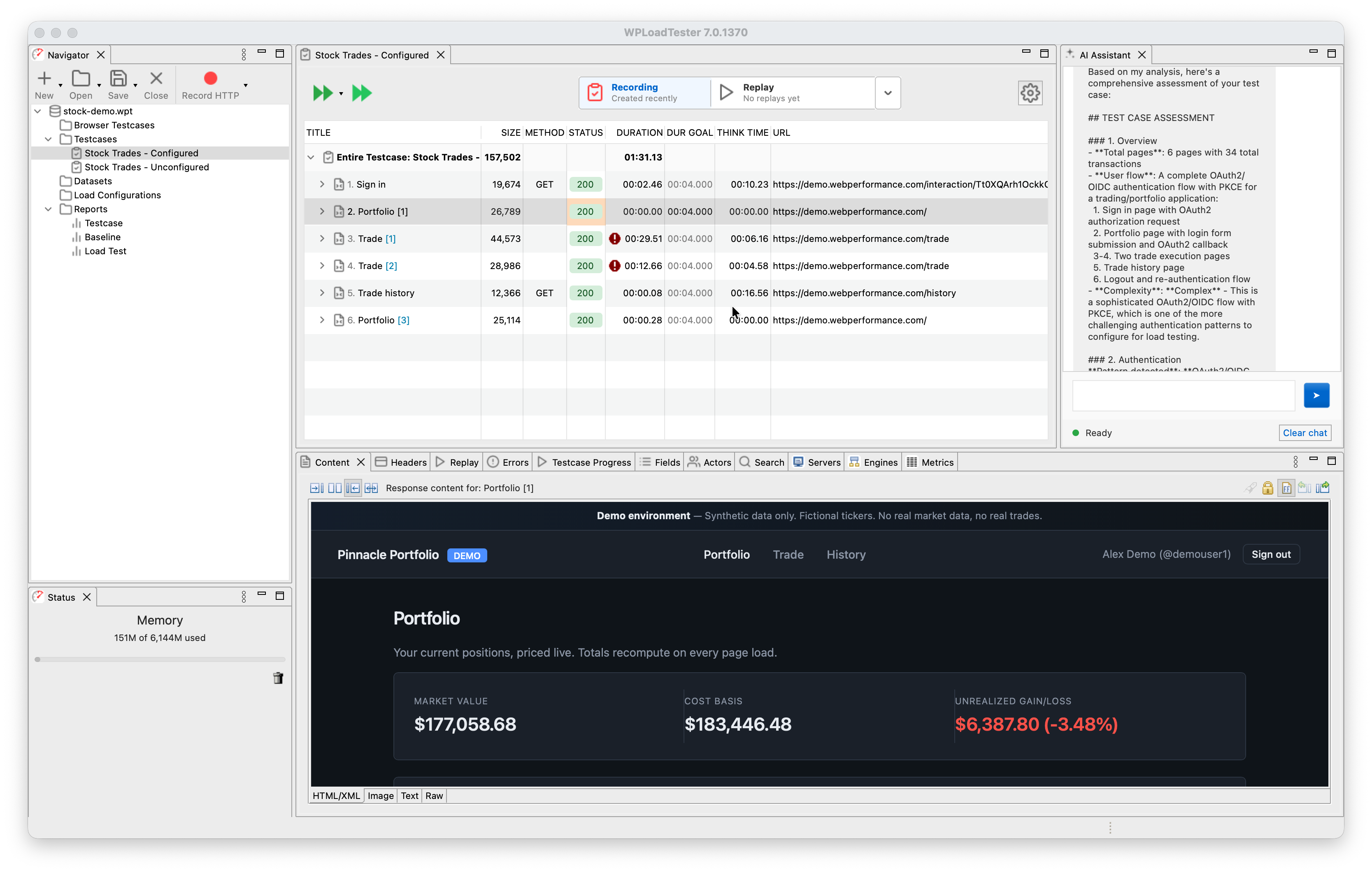
The hardest part of load testing has always been getting a recording to replay correctly. Modern web apps rotate tokens on every hop: CSRF tokens, session IDs, OAuth state parameters, anti-forgery canaries, JWT bearer tokens, etc, and each one needs to be captured from a response and re-inserted
into the next request. Configuring this by hand, for a modern SSO flow, is a multi-day job that requires deep HTTP-protocol knowledge.
In 7.0, you hand the AI Assistant a recording and ask it to configure authentication. In one working example, the assistant was given a 136-transaction recording that spanned four domains and authenticated via Auth0 using OAuth2/PKCE. It classified the flow, detected the identity provider, enabled the right platform detection rules, fixed two orphan cookies, and handed back a test case that replayed successfully in about an hour of wall-clock time, most of it spent waiting for replays to confirm
each step.
Under the hood, 7.0 ships 75 MCP tools, which the AI uses to introspect and mutate the test case. They work on the Automatic State Management (ASM), the correlation engine that ships with the product, and
they extend it to handle edge cases that ASM can’t detect by itself: proprietary session patterns, custom header schemes, unusual token-embedding styles. When something doesn’t work, the AI explains what it tried and why, and you can intervene at any step.
New in 7.0: the same 75 tools are exposed as a network MCP server, so if you already use Claude Code, Cursor, or Claude Desktop, you can point them at WPLoadTester and configure test cases from your editor.
AI-Assisted Reports
Writing a performance analysis report by hand, the kind that ends up in a client deliverable, is about a day’s work. You pull per-user-level metrics, identify the capacity ceiling, spot the bottleneck, walk through the error modes, annotate the charts, and write it up in prose. If you do one of these a week, that’s a day a week.
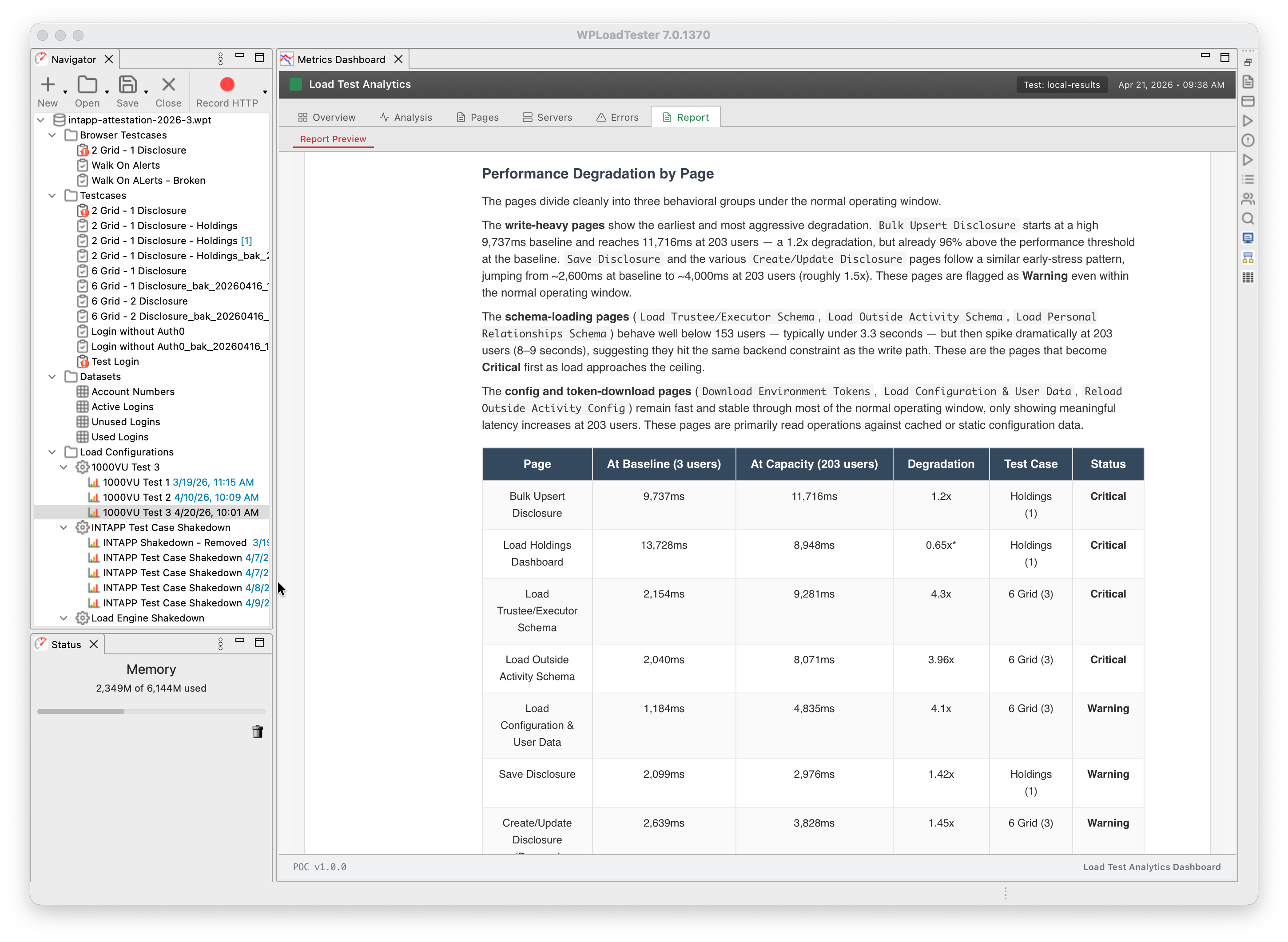
The 7.0 Report Generator does it in roughly fifteen minutes. It produces a DOCX file with styled tables, nine chart types, per-page degradation analysis, capacity-ceiling identification, CPU-bottleneck detection, and prose that reads like a consultant’s write-up, because its structure is based on real reports written for real clients.
Two things to be clear about:
- The reports are not autonomous. They need your review. The AI is good
at pattern recognition across thousands of metrics; it’s less reliable at
the sharp prose and domain-specific annotations that make a deliverable
shine. Read it, augment it, correct it. It gives you a first draft, not
a finished product. - Every number in the report comes from a tool call. If a metric isn’t
in the data, the report says so rather than hallucinating a value. That
discipline is enforced in the prompt and backed by the tool architecture.
We’ve been using it internally to analyze test results that used to take a day of write-up. The reports now match the conclusions we reach when writing by hand.
What’s not in 7.0 (yet)
Real browsers. The Selenium-4-based real-browser replay path that drove actual Chrome against your application is deferred to 7.1. 7.0 ships HTTP protocol only. The four capabilities above are what’s available today.
Technical deep-dive
For engineers who want to see how the MCP tool architecture, the Scenario Router, the actor-critic report loop, and the anti-hallucination guardrails actually fit together, Michael Czeiszperger has a full technical writeup:
Building Agentic AI Systems for Web Performance Load Tester 7.0
Try it
7.0 is in closed beta while we harden the AI auto-configuration and the
Load Test Analytics dashboard against real-world workloads. The beta is
free — we’re looking for teams willing to load-test their own applications
and give us detailed feedback.
Request access: webperformance.com/beta/

Founder of Web Performance, Inc
B.S. Electrical & Computer Engineering
The Ohio State University
LinkedIn Profile
Get web performance news
Occasional load-testing tips, performance-engineering notes, and product updates. No spam — unsubscribe anytime.