Network Configuration
Remote Testing
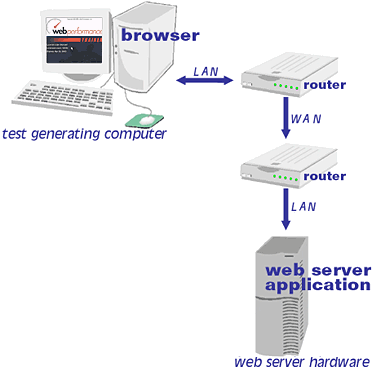
A common situation is where the person running the test is at another location than the web server. There are two ways to handle this situation, which differ in the location of the software generating the virtual users. In the configuration shown below, Web Performance Trainer™ is run at one location, while the web server can reside anywhere on a WAN, in another state, or even another country.
This configuration tests the performance of all networks between the computer generating the virtual user and the web server, as well as the web server itself. The number of virtual users you can simulate is limited by the bandwidth between the test computer and the web server. For example, if the test computer is connected to the internet by DSL with a bandwidth of 200 KBytes per second, you would be able to simulate 40 56Kbit/sec modem connections, which have an affective bandwidth usage of 5Kbytes/sec.
One thing to watch for in this configuration is users at a company location typically share an internet connection, so a performance test would have to be performed when no one's using the network.
Larger simulations require that the dedicated bandwidth from test generating computer to the internet be at least as large as the network connection of the web server. For example, if your web server is connected to the internet by a T3, then the test generating computer has to be connected by a T3 dedicated to load testing.
One way to handle this configuration that eliminates most bandwidth restrictions is to use a remote playback engine. In this configuration Web Performance Trainer™ is split into two parts, a controller, and a playback engine. The playback engine is placed on a computer on the same LAN as the web server, while the controller remains in the remote location. The controller is used to remotely control the playback engine, keeping the heavy network load on the LAN, while allowing remote control over the test.
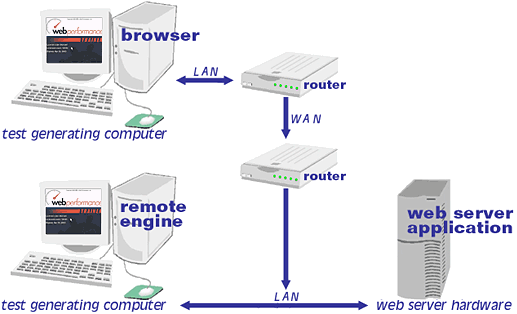
In this configuration care should be taken to stop running the playback engine when its not being used for security reasons.